Create an agent that can browse the web with Managed Deep Agents and Browserbase's Stagehand

Video thumbnail: Create an agent that can browse the web with Managed Deep Agents and Browserbase's Stagehand
Aug 10, 202610m 39s video lengthLangChain

The Signal

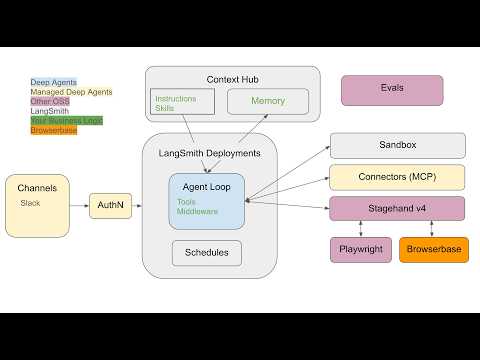
Building reliable browser-based agents requires moving beyond local Playwright scripts toward production-grade infrastructure. This walkthrough demonstrates a stack using LangSmith Managed Deep Agents for the harness, Stagehand v4 for browser tools, and Browserbase for scalable execution. The central tradeoff lies in choosing between rapid local prototyping and robust, inspectable production deployments that allow for instruction updates without code changes.

The Case

The Stack Architecture

  • Managed Deep Agents, a new product for deploying agent harnesses and infrastructure, acts as the primary runtime environment, while Stagehand v4 provides the interface to interact with web pages.0:42
  • The stack uses a dual-infrastructure model: local development runs via Playwright, and production deployments use Browserbase to provide replayable, scalable browser execution.1:53
  • A core requirement for using the managed agent workflow is an active LangSmith plus or paid subscription, as the tooling is not available on free-tier plans.2:38

Operational Constraints

  • The agent is restricted to three tools: snapshot for hydrating clickable element IDs, run for executing JavaScript or snapshot actions, and screenshot for visual inspection.3:41
  • A critical failure mode involves stale element IDs; because snapshot IDs are valid only for the latest page state, the agent must re-snapshot immediately after any navigation.4:42
  • Browserbase sessions act as the primary observability layer, providing a recorded replay of scrolling, network calls, and final visual state that allows developers to debug complex multi-step browser tasks.6:31

Production Deployment

  • Deploying via the mda deploy command creates a serverless LangSmith deployment and a Context Hub entry, which stores the agent's instructions as editable prompts.
  • Separating the prompt from the code allows for live behavior tuning, meaning agents can be updated and re-run through the LangSmith Studio UI without triggering a full redeployment cycle.8:31

The 1 Minute Signal Take

This stack provides a cohesive path from local testing to production-ready browser automation, provided you accept the operational discipline required to manage snapshot states. For projects requiring multi-step navigation, the ability to inspect Browserbase session replays is the most significant value-add for debugging agent behavior in the wild.

Pro Analysis

Why It Matters

This stack addresses the 'last mile' problem in AI agent development: the gap between a prompt that works in a sandbox and a production service that can reliably navigate the web. By standardizing the harness (LangSmith), the interaction layer (Stagehand), and the infrastructure (Browserbase), it reduces the complexity of managing headless browser state at scale.

Strategic Implications

Standardizing on this architecture ties engineering teams closely to the LangSmith/Browserbase ecosystem. While this accelerates speed-to-market and simplifies maintenance, it also creates a platform dependency. Teams must weigh the benefit of 'all-in-one' tooling against the risk of vendor lock-in.

Evidence & Hype Audit

This is a promotional product demo. While the implementation shown works for the provided examples (ESPN and Hacker News), the video does not provide data on cost efficiency, concurrency limits, or error rates when encountering complex anti-bot measures. The 'production-grade' label is a claim, not an audited benchmark.

Counterarguments

Critics might argue that building on a managed stack limits the ability to optimize for edge cases, such as custom browser fingerprints or specific network-level bypasses that a bespoke Playwright implementation might handle more easily.

Who Should Care

  • AI Engineers: Specifically those tasked with building reliable agentic automation.
  • Product Managers: Those looking to shorten the cycle between prototyping a 'browsing agent' and deploying it to users.

What to Do Next

  • Provision a LangSmith Plus account to enable Managed Deep Agents.
  • Clone the integration repository to run a local test.
  • Implement a robust snapshot-refresh logic loop to handle page changes.
  • Configure Browserbase to capture full network logs for production sessions.
  • Integrate an evaluation layer in the Context Hub to test prompt changes before full deployment.
Time saved:7m 27s

Share this

Tags

Written by: 1 Minute Signal Editorial Team